
A multi-day heavy rainfall event will continue over the western Gulf Coast through Monday. Slight Risks of excessive rainfall have been issued, and Flood Watches remain in effect through Monday evening. Scattered severe storms capable of producing large hail and damaging winds are possible across western portions of Texas and Oklahoma on Friday. Read More >
Help NWS Seattle keep your staff proficient!
We at NWS Seattle are happy to help our partner agencies maintain their proficiency on our still relatively new Spot Forecast Request Page. As you guide your staff through the Spot Forecast request process, we ask that you use the following steps as a framework for your training and requests. This will not only help to ensure your staff gets the skills and familiarity needed for these requests, but it also helps our forecasters be fully aware of what actions, if any, these requests need. In working together, we can provide the most timely and informative responses.
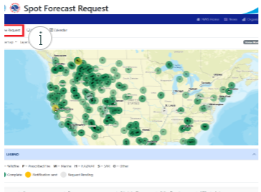
Go to spot.weather.gov . This will take you to the nationwide map, which can be a little crowded. However, you can still input
your Spot Request here with the New Request link at the top-left side of the page, which goes to the Spot Request form.
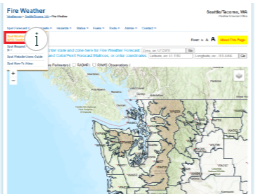
Go to https://www.weather.gov/wrh/fire?wfo=sew . This is the localized Fire Weather website for the NWS Seattle forecast office.
From here, clicking on the Spot Forecast drop-down menu will bring up the link for the Spot Monitor/Request page with
a focus on the Pacific Northwest.

As you can see, not only does this make for a less busy map, if you scroll down from the map it also limits the Spot Forecasts
listed, making your eventual forecast easier to find. You can zoom in further if you so choose, further limiting both the map and the
list of Spot Forecasts. The functionality of the New Request link remains the same as above.
You can do this with a Street Address, Latitude/Longitude (decimal or deg/min/sec) or USNG. If you don't have any of that, don't worry.
There's also a map of the U.S. below these options where you can click on your location.
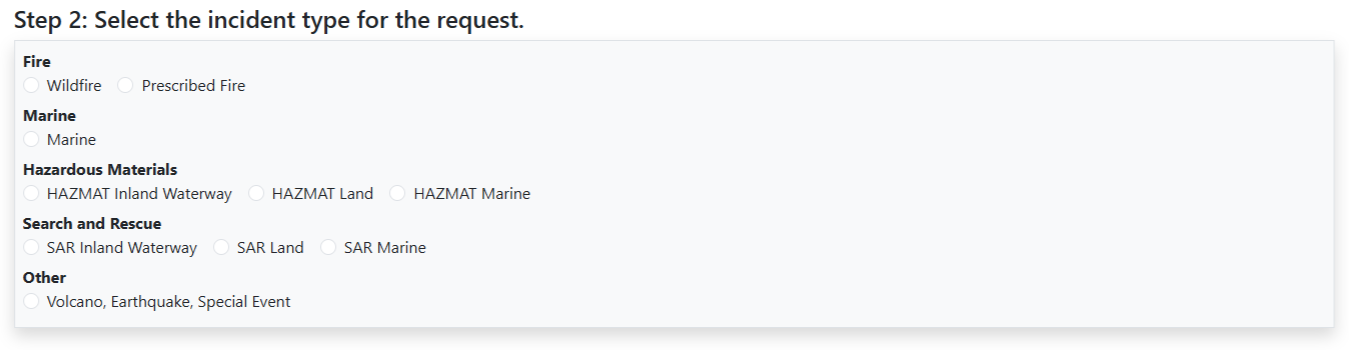
Each option has a predetermined set of weather elements for you to choose from in the next step. If your intent is to simply test
request proficiency and no actual forecast is needed, please select 'Other'. If the intent is to get a forecast for an incident or
exercise, please choose the type of event in progress or being simulated.
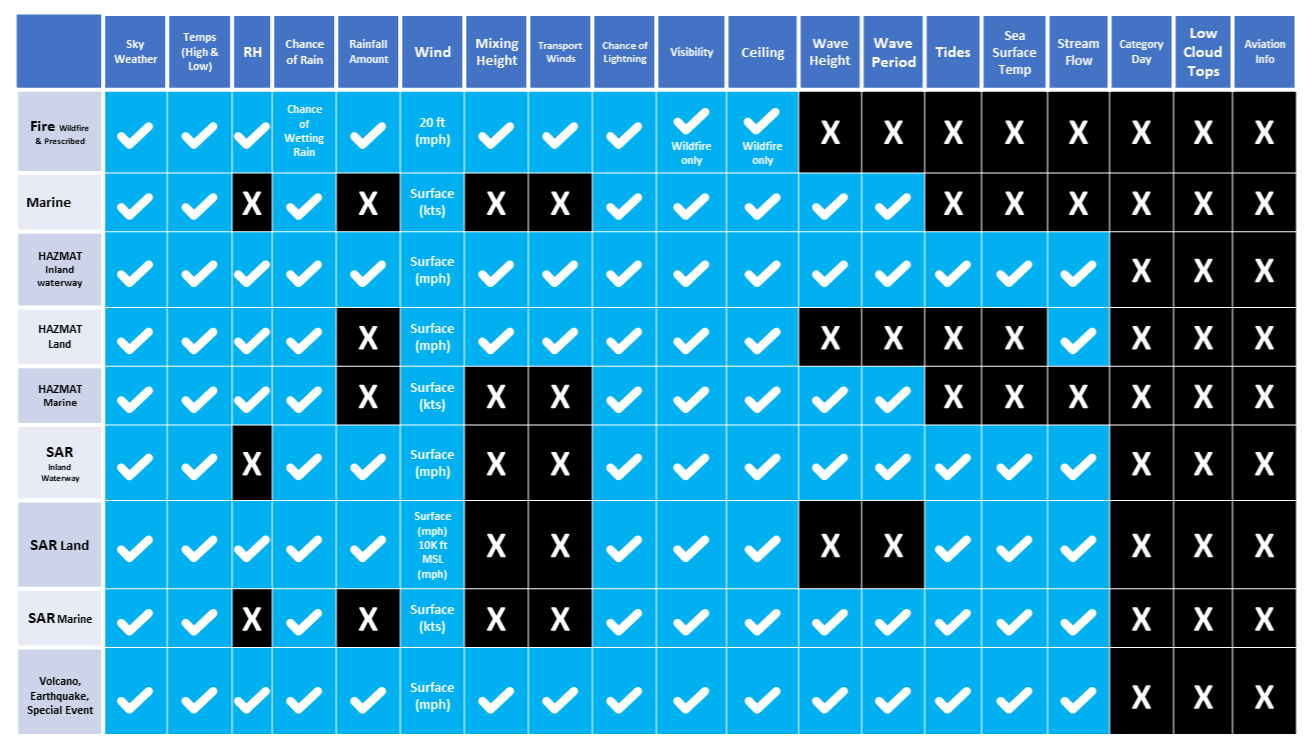
The image shows which Forecast Elements come with each Incident/Spot Forecast Type. Along the left side of this matrix are
the types of Spot Forecasts you can request, while along the top are the weather elements available. Choose the Forecast Type
that best fits your scenario. If there are elements you need that are NOT on the list or offered by the forecast type you have chosen,
you can request them later on in the request form via the REMARKS section.

For new or ongoing incidents, simply enter the name of the incident here. For TEST Spots (including exercises):
-- If you DO NOT want to receive a forecast, please include "TEST NO" somewhere in the Project Name. This will clearly
display the intent of the request to NWS Forecasters.
-- If you DO want to receive a forecast, please include "TEST YES" in the Project Name
Just like the Project Name, the following boxes are mandatory for your spot request.
-- Requesting Agency: Provide the agency you represent. Please remember that Spot Requests can only be submitted by Federal,
State, Tribal or Local officials & agencies, or contractors thereof. Spot Requests from private citizens or commercial entities
WILL NOT be fulfilled.
-- Requesting Official, Email Address & Phone Number: Provide the name and contact information of the Point of Contact (POC)
for this request. This can be the individual making the request or someone with direct knowledge of the reasoning or needs for
this request. It is VITAL that a working email address and phone number are provided so that if NWS forecasters have questions
about the request, they can get in touch with someone who can provide answers, even if the reason for the request is strictly a test.
Additionally, the spot forecast can be emailed to more than one individual. After inputting the first email address, click on the
"Add an email" box underneath for a second box for another email. This can be repeated for any number of email addresses you have
to provide.
-- Contact Person: If the POC is NOT the requesting official, please put that individual's name here. The phone number from the
previous section should lead to this individual if at all possible. If the POC is the requesting official, this box can be left blank.
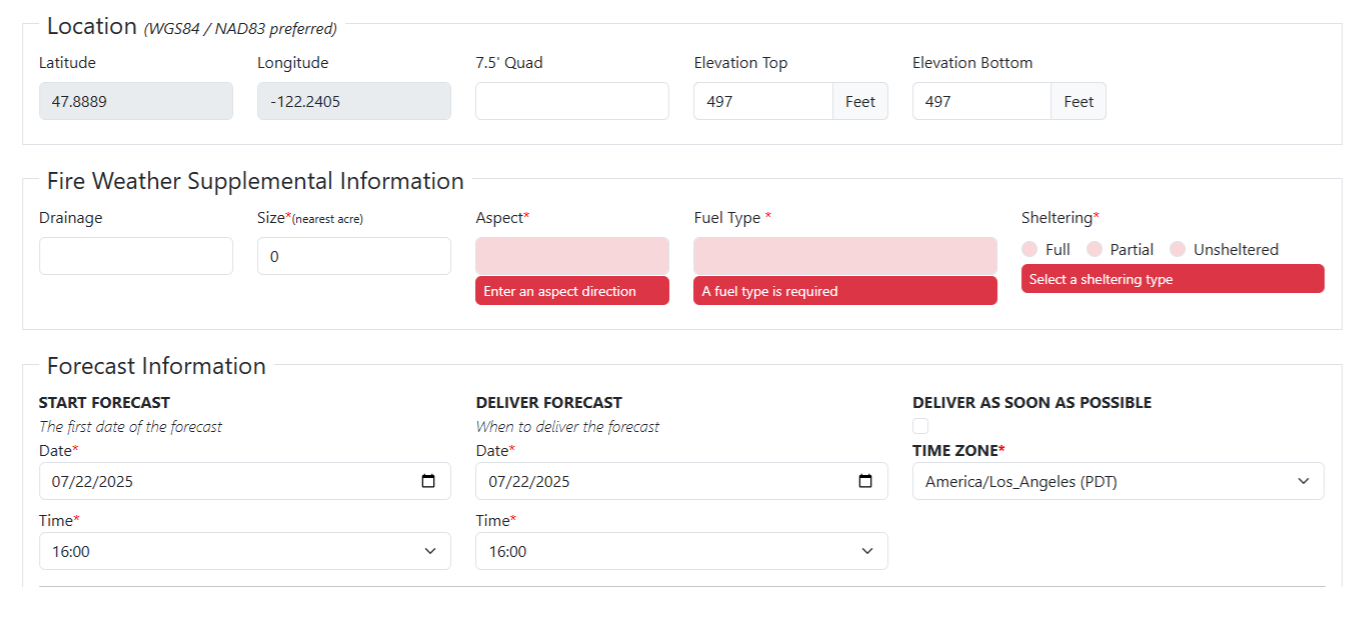
First, confirm that the Latitude & Longitude of your incident is correct. These are grayed out, so you cannot change them here.
You'll need to go back to the previous page. If your incident spans an area where changes in elevation are relevant, please provide
the Top and Bottom elevations.
-- Fire Weather Supplemental Information: This will only appear for Wildfire and Prescribed Burn Spot Requests. Size, Aspect,
Fuel Type and Sheltering are all mandatory inputs. If you do not know the size, 0 can be used.
Forecast Information
-- Start Forecast: This is when you when you want the forecast to start. Simply input the date and time you want the forecast to be
valid for.
-- Deliver Forecast: This is when you want to receive the forecast. Please remember that the Deliver Forecast Time/Date must be
either EQUAL TO or BEFORE the Start Forecast Time/Date. If you need the forecast ASAP, select the checkbox under Deliver
As Soon As Possible.
For Example: If you are on a wildfire and you're putting in a Spot Forecast request for the next day's Incident Action Plan and
you'd like to have that forecast in hand when Plans parts are due, your Spot Request might have a Start Forecast date & time of
7/23/2025 at 0600 and your Deliver Forecast date & time would be 7/22/2025 at 1800.
-- This tells NWS forecasters that you want a forecast starting at 0600 on the 23rd but you want it by 1800 on the 22nd.
Please keep in mind that certain times will impact which timeframes and the number of periods you will get.
-- Times prior to 0600 will start with "REST OF TONIGHT" and cover the overnight period (including low temperatures,
maximum RH's, etc.). A maximum of four periods are provided: Rest of Tonight, Day 1, Night 1, Day 2.
-- Times between 0600 to 0959 will start with "TODAY" and cover the daytime period (including high temperatures, minimum
RH's, etc.). A maximum of three periods are provided: Today, Tonight, Day 2
-- Times between 1100 to 1759 will start with "REST OF TODAY", but will still cover the same forecast elements and periods
as "TODAY".
-- Times between 1800 to 2359 will start with "TONIGHT" and cover the same forecast elements as listed in the first entry above.
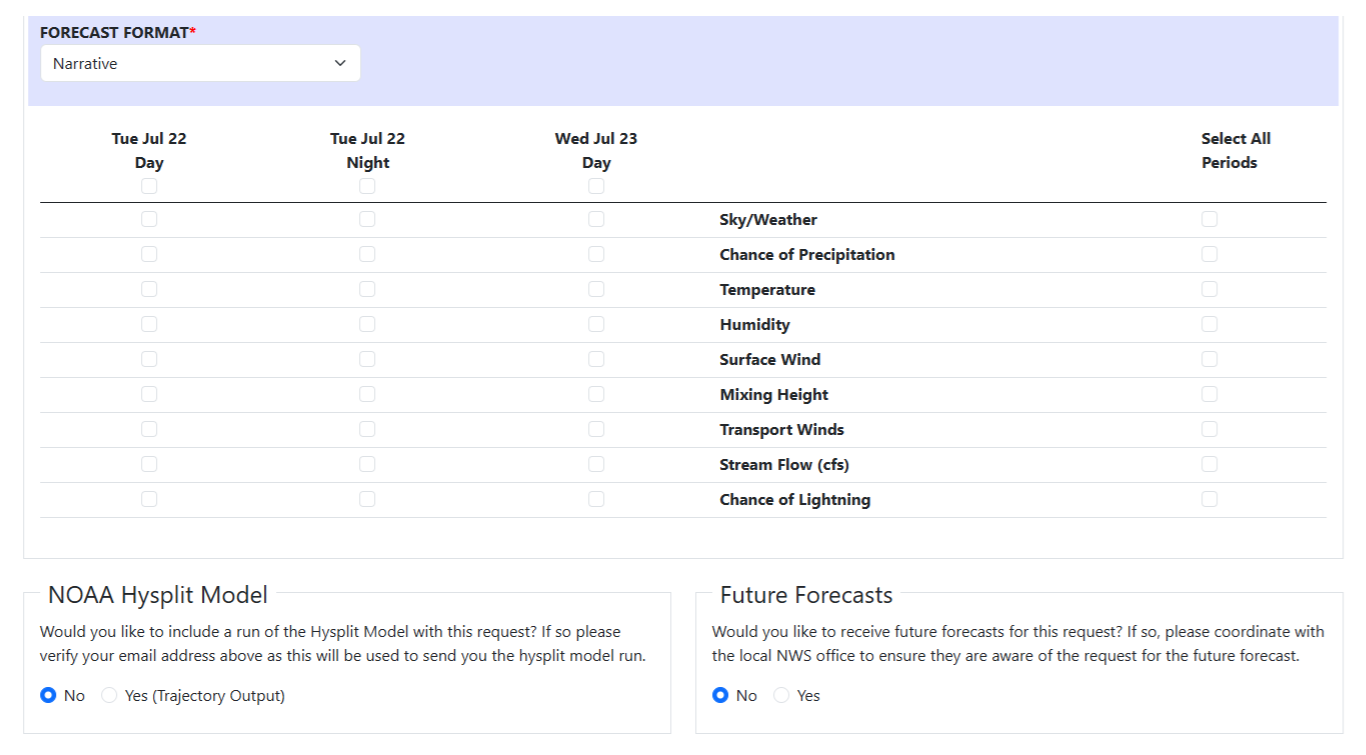
Next, you'll determine the format you'd like your forecast in, which elements to include and which periods to cover. You'll also be
provided with two options: would you like a Hysplit plume model run and would you like future forecasts based on this request.
-- Forecast Format: At this time, only the Narrative format is available. This provides you with a discussion section where the
forecaster highlights any significant weather, trends and/or concerns that are relevant to your interests, goals or trigger points.
-- Forecast Elements/Periods: Here you can choose which weather elements you want included in your forecast and when you
want those elements for. Weather elements are determined by what type of Spot Forecast you've requested, the periods determined
by the start date/time you've entered in Step 4a.
-- NOAA Hysplit Model: Hysplit offers model-based trajectory data, showing how certain weather elements will impact where
and how far from the source a smoke or chemical plume may travel. If you need this kind of information, select 'Yes'. The output
will be sent to you via email. A KMZ file will be included so that you can lay the output over a map via Google Earth.
The intent behind this feature is to prevent additional spots from the same incident or project needing to be requested routinely by the requesting official.
-- NWS forecasters will be notified of a future forecast 6 hours ahead of the time and day that it has been requested for delivery,
and then again with 1 hour to go before the requested delivery time.
-- You will still receive an email confirmation that a spot forecast was submitted. This is where you will go to edit the request to include additional future forecasts after the initial submission.
-- For any future forecasts, the forecast Start Time will be set to match the Future Forecast Deliver Time. In order to save changes to the form, the deliver time and start time must be in the future. Care should be taken to ensure that there are NOT two forecasts pending for the same timeframe by way of a previous submission.
-- For example: If there is a future forecast pending for tomorrow, and you need to make an edit to the form and/or future forecasts, you may need to move tomorrow's future forecast into the main form to ensure that there are not duplicate requests.
-- For prolonged events (such as Wildfires, HAZMAT Recovery, etc.) where future forecasts have been requested, we highly recommend reaching out to NWS Seattle via our 24-hour phone number: 206-526-6087 to let us know that this has been requested to ensure that we can best meet your needs.
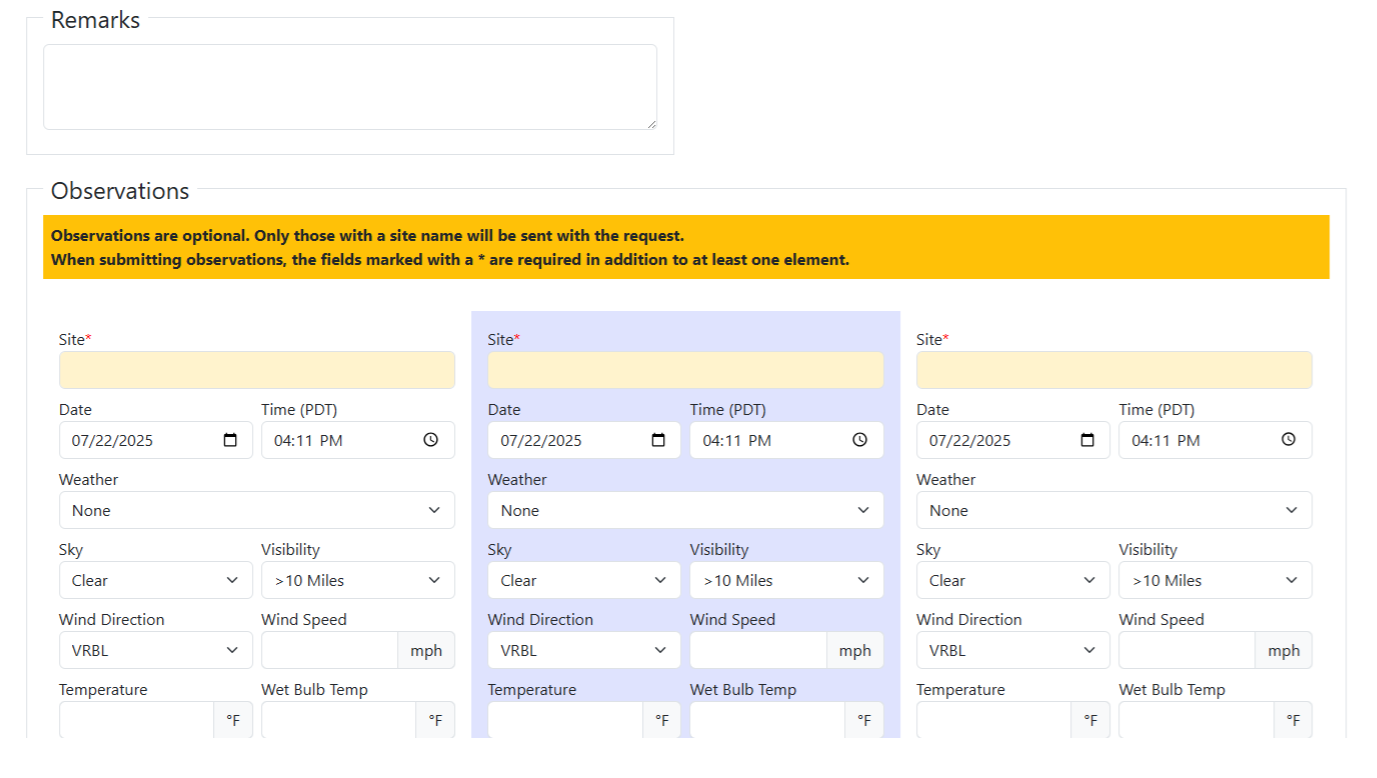
The Remarks section serves as a catch-all. If there is something you would like that isn't covered by the previous sections,
this is where you'd ask for it. This could include, but isn't limited to:
-- Trigger points: Are there weather thresholds that could result in additional or critical actions in the field? Be sure
to let us know and we can address them!
-- Forecast delivery: Is there some other means you'd like us to deliver a copy of the forecast by? Put that information here.
-- Forecast Elements: As stated above, if there are forecast elements that you are interested in, but were not an option due
to the type of Spot Request you're submitting, this is the place to mention them. NWS Forecasters will either try to insert that
data or at the very least ensure this field is addressed in the discussion section of the forecast.
-- Nearest Weather Station: If there is a nearby RAWS or ASOS station that is providing weather observations representative
of where your incident is located, please be sure to mention that here! This provides ground truth which in turn helps NWS
Forecasters to fine tune their forecast to your location. While Observations are not mandatory for submitting a Spot Request,
any weather data you can provide, either via Observers out in the field or nearby weather station, helps NWS Forecasters fine
tune the forecast, as mentioned above. Information you can provide includes:
-- Site (This can be a location on the fire, such as ICP or a Division on the line, where the Observers is located, or the weather
station you're taking the info from)
-- Date & Time of the observation
-- The Weather observed (Such as Rain, Smoke, Fog or None)
-- Sky condition and Visibility
-- Wind Direction and Speed
-- Temperature & Wet Bulb Temp
-- Relative Humidity & Dew Point
-- Elevation
-- Significant Wave Height
-- Remarks Only the Site name is mandatory, so if you only have some of the above information, that's fine. You'll still be able to
submit the observation. At this time, there is only room for FIVE observations per request. However, once you submit your initial
request and receive the associated Token Email, you'll be able to send updated and/or additional Observations from the links
provided within.
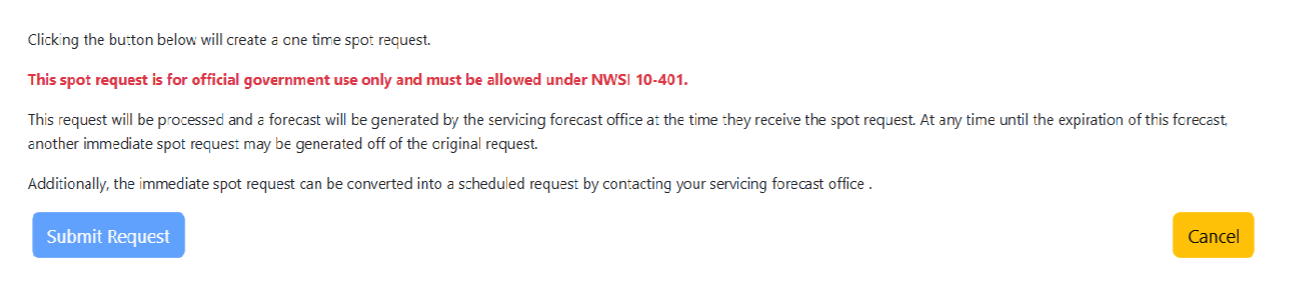
Once you've completed entering everything you need from your request, press the blue "Submit Request" button. If there is a
mandatory field that has not been filled in, the request will not go through, so be sure to double check you inputs. If you've asked
for Delivery As Soon As Possible, NWS Forecasters will be alerted almost immediately and your request will be fulfilled within 30
minutes. If you've specified a Delivery Time, Forecasters will still be notified but will receive a second notification 1 hour prior to
your designated time.

Once you submit your request, the email addresses you included in your request will receive a Confirmation Email. Within,
there are THREE important links that are unique to your incident: one taking you to your Spot Forecast (once it's
completed), another that allows you to edit your request or request an update and a third that allows you to provide
additional Observations. NWS Seattle also receives this email so, in the instance of prolonged incidents, our forecasters
can help make edits and alterations as well. Note: The blacked-out portions of the image above are unique to each request.
Once your Spot Forecast is complete, you can find it at spot.weather.gov . Also, an NWS Forecaster will call the Phone
Number provided in your initial request to confirm completion of the forecast and let you know that it is available online.
Feel free to reach out to the NWS Seattle Fire Weather focal point (madelyn.kristell@noaa.gov) or to NWS Seattle in
general, either via the phone number listed above or email at nws.seattle@noaa.gov.



 Follow us on X
 Follow us on Facebook
 Follow us on YouTube
 SEW RSS Feed